
Cineats
Building a better movie theater experience
Role
UX/UI Designer
Timeline
2 months
Team
Solo
Tools
Figma
Summary
The Google UX Design Certificate is a career certificate offered by Google through Coursera that aims to teach the foundations of UX design. During the summer of 2021, I was able to learn and experience what is like to be a UX Designer for the first time through my first course project.
Starting from a generic prompt, I worked solo on this project to design a movie theater mobile app, focusing on snack ordering, from the ground up based on my research findings.
The Project Starting Point
This project started with a simple prompt: “Design a movie theater, snack-ordering app.”
By using UX research methods, I was able to outline the product’s vision, define the problem, and determine the goal
the problem
Moviegoers struggle with waiting in line for snack orders, which often leads to missing the beginning of the movie, leaving mid-session for more snacks, and consequently missing more of the film.
the Goal
Design an app that allows users to order snacks in advance, so waiting in line before the movie starts isn’t necessary, and provide a way for the user to get more snacks during the movie without missing parts of it.
the vision
Believing the experience of going to the movies isn't complete without snacks, the Cineats App was created to offer an easy and convenient way for users to order snacks before and during the film, and while purchasing tickets.
Research Phase
To kick off research, I conducted a competitive analysis to understand the competitor’s strengths and weaknesses and four user interviews to identify the users and understand their pain points.
I identified two user groups:
- Families with kids who have to order snacks when they go to the movie theater
- Young adults who enjoy going to the movies quite often.
Both user groups confirmed assumptions regarding the wait time at the concession stand and missing important parts of the movie. My research also revealed that, although most moviegoers would enjoy snacks during the movie, not everybody ends up purchasing because of the high prices offered.
Major Pain Points

Time
People usually don’t have a lot of time from when they arrive at the movie theater to when the movie starts to wait in line to order snacks.

Convenience
It is inconvenient to miss part of the movie when leaving the auditorium to get snacks.

Price
The price of snacks offered in the movie theater discourages users from eating during the movie.
Persona Statements
“Kathleen is a mother of 4 who needs a better way to order movie snacks in the movie theater because she can’t enjoy the movie when she leaves mid-session to grab more snacks.”
“Carlo is a movie enthusiast who shares a movie review website with his partner, who needs a way to order more snacks during the movie because he can't miss parts of it to write reviews.”
Design Phase
Sketching
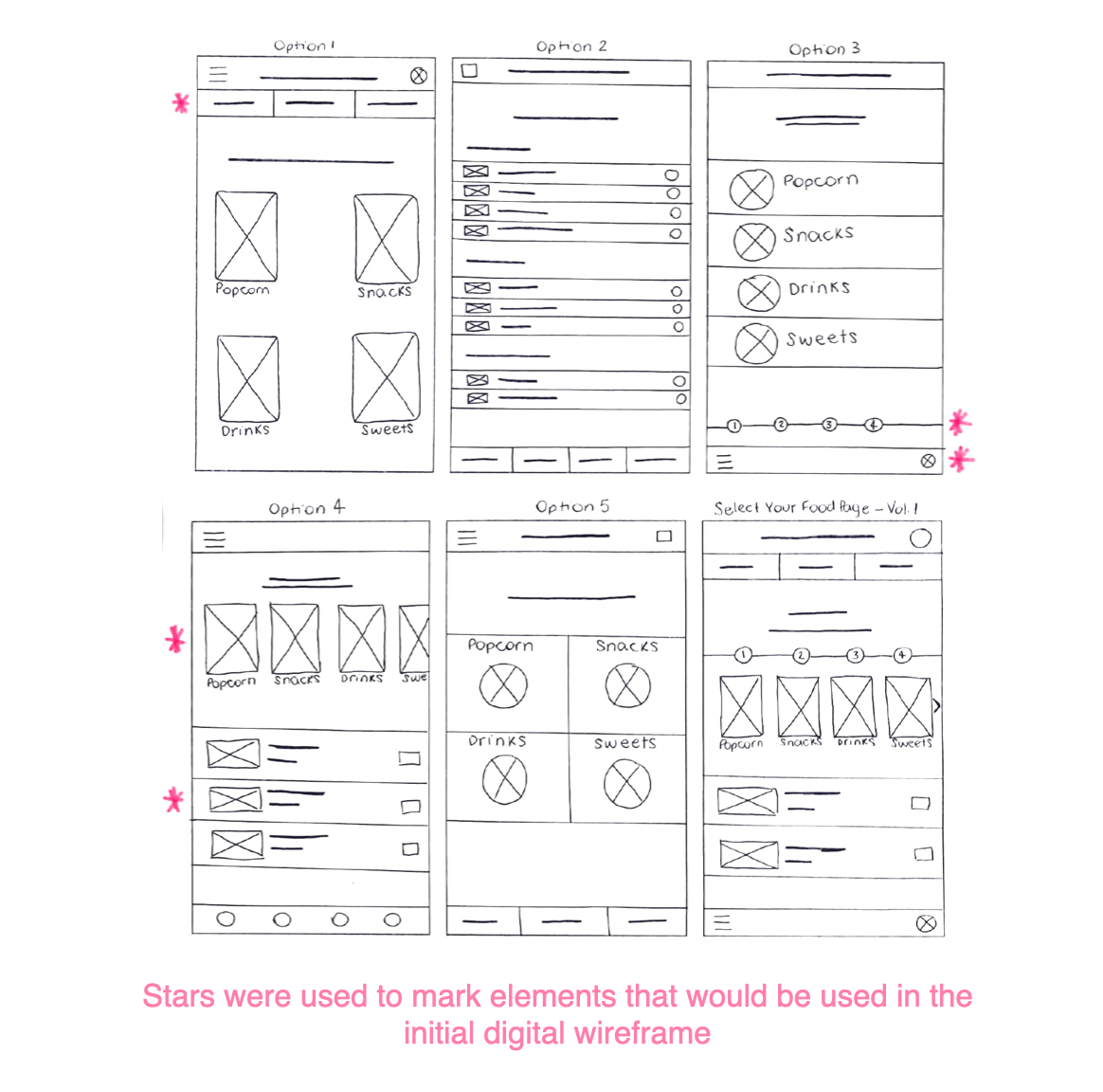
Iterating each page of the app on paper helped ensure that the elements that moved to digital wireframes focused on addressing user pain points.
Wireframes
I made sure the low-fidelity wireframes had a clear enough structure so that I could create a low-fi prototype where users could test the primary flow.
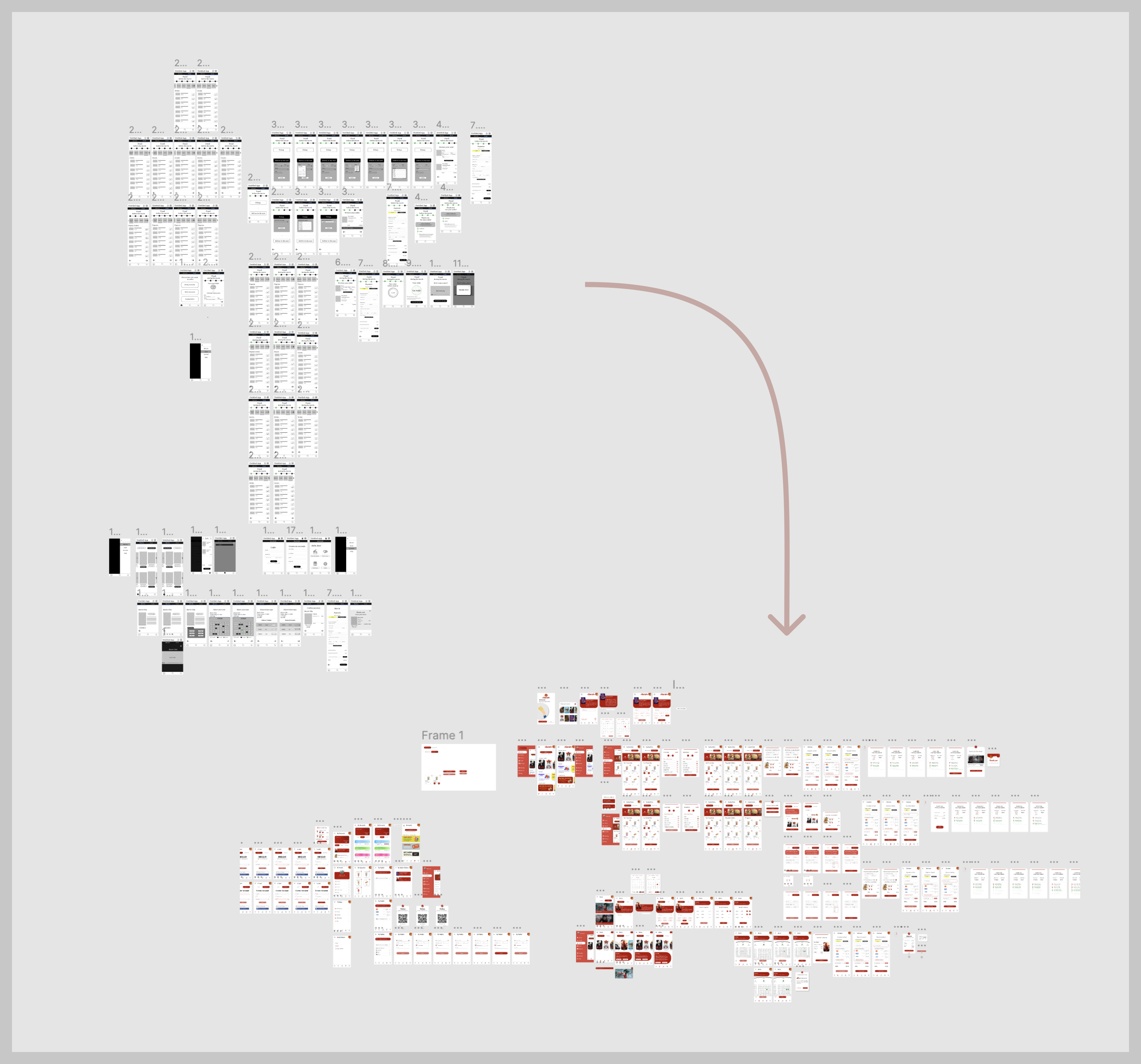
Considering the user pain points, inconvenience, price, and time, I incorporated potential solutions into my initial low-fi wireframes.
Usability Testing
I conducted two rounds of usability studies during the project. The first study resulted in findings that helped to adjust wireframes before transitioning to mockups. The second study, conducted with a high-fidelity prototype, clarified what aspects of the mockups needed refining.
Round 1 Findings
- Users want a way to save their favorites in the food section.
- Users want to finish the order process fast.
- Users need labeled icons to know what they are clicking.
Round 2 Findings
- Users want “Rewards” info to be more visible throughout the app.
- Users struggled with button labels and font size. fast
- Users want more control over when their pickup order.
Given finding #3, that users wish to have more control over when their pickup order starts to be prepared, I removed the option “Select time for pickup” and added the “Start Order” button so users could start the order when they please.
Final Designs
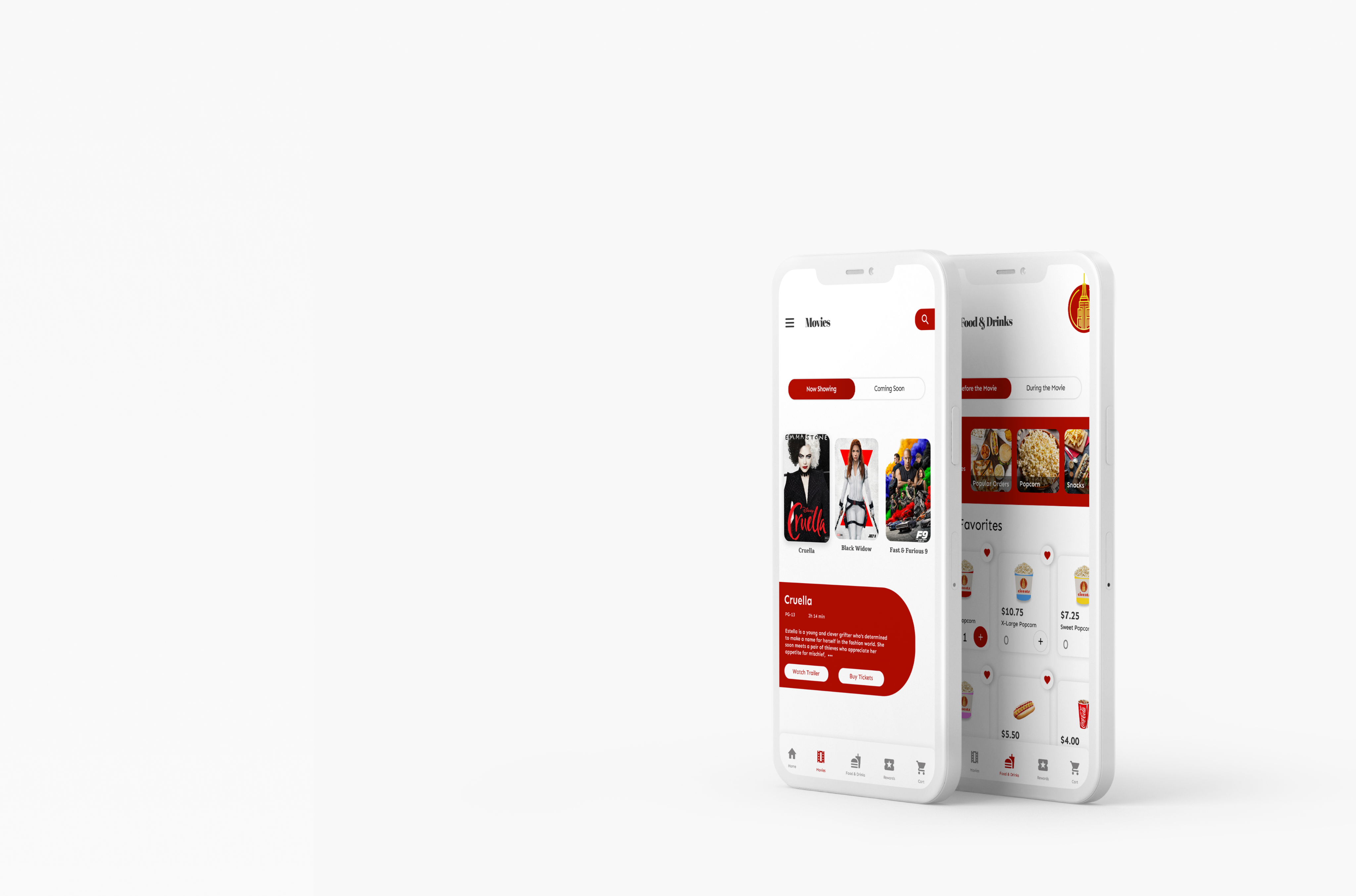
The high-fidelity prototype presented clearer user flows for ordering snacks (during or before the movie) and navigating through the app. It allowed users to experiment with all possibilities, from ordering snacks and buying movie tickets to redeeming coupons and creating an account.
Cineats
Building a better movie theater experience
Role
UX/UI Designer
Timeline
2 months
Team
Solo
Tools
Figma
Summary
The Google UX Design Certificate is a career certificate offered by Google through Coursera that aims to teach the foundations of UX design. During the summer of 2021, I was able to learn and experience what is like to be a UX Designer for the first time through my first course project.
Starting from a generic prompt, I worked solo on this project to design a movie theater mobile app, focusing on snack ordering, from the ground up based on my research findings.
The Project Starting Point
This project started with a simple prompt: “Design a movie theater, snack-ordering app.”
By using UX research methods, I was able to outline the product’s vision, define the problem, and determine the goal
the problem
Moviegoers struggle with waiting in line for snack orders, which often leads to missing the beginning of the movie, leaving mid-session for more snacks, and consequently missing more of the film.
the Goal
Design an app that allows users to order snacks in advance, so waiting in line before the movie starts isn’t necessary, and provide a way for the user to get more snacks during the movie without missing parts of it.
the vision
Believing the experience of going to the movies isn't complete without snacks, the Cineats App was created to offer an easy and convenient way for users to order snacks before and during the film, and while purchasing tickets.
Research Phase
To kick off research, I conducted a competitive analysis to understand the competitor’s strengths and weaknesses and four user interviews to identify the users and understand their pain points.
I identified two user groups:
- Families with kids who have to order snacks when they go to the movie theater
- Young adults who enjoy going to the movies quite often.
Both user groups confirmed assumptions regarding the wait time at the concession stand and missing important parts of the movie. My research also revealed that, although most moviegoers would enjoy snacks during the movie, not everybody ends up purchasing because of the high prices offered.
Major Pain Points
Time
People usually don’t have a lot of time from when they arrive at the movie theater to when the movie starts to wait in line to order snacks.
Convenience
It is inconvenient to miss part of the movie when leaving the auditorium to get snacks.
Price
The price of snacks offered in the movie theater discourages users from eating during the movie.
Persona Statements
“Kathleen is a mother of 4 who needs a better way to order movie snacks in the movie theater because she can’t enjoy the movie when she leaves mid-session to grab more snacks.”
“Carlo is a movie enthusiast who shares a movie review website with his partner, who needs a way to order more snacks during the movie because he can't miss parts of it to write reviews.”
Design Phase
Sketching
Iterating each page of the app on paper helped ensure that the elements that moved to digital wireframes focused on addressing user pain points.
Wireframes
I made sure the low-fidelity wireframes had a clear enough structure so that I could create a low-fi prototype where users could test the primary flow.
Considering the user pain points, inconvenience, price, and time, I incorporated potential solutions into my initial low-fi wireframes.
Usability Testing
I conducted two rounds of usability studies during the project. The first study resulted in findings that helped to adjust wireframes before transitioning to mockups. The second study, conducted with a high-fidelity prototype, clarified what aspects of the mockups needed refining.
Round 1 Findings
- Users want a way to save their favorites in the food section.
- Users want to finish the order process fast.
- Users need labeled icons to know what they are clicking.
Round 2 Findings
- Users want “Rewards” info to be more visible throughout the app.
- Users struggled with button labels and font size. fast
- Users want more control over when their pickup order.
Given finding #3, that users wish to have more control over when their pickup order starts to be prepared, I removed the option “Select time for pickup” and added the “Start Order” button so users could start the order when they please.
Final Designs
The high-fidelity prototype presented clearer user flows for ordering snacks (during or before the movie) and navigating through the app. It allowed users to experiment with all possibilities, from ordering snacks and buying movie tickets to redeeming coupons and creating an account.

Cineats
Building a better movie theater experience
Role
UX/UI Designer
Timeline
2 months
Team
Solo
Tools
Figma
Summary
The Google UX Design Certificate is a career certificate offered by Google through Coursera that aims to teach the foundations of UX design. During the summer of 2021, I was able to learn and experience what is like to be a UX Designer for the first time through my first course project.
Starting from a generic prompt, I worked solo on this project to design a movie theater mobile app, focusing on snack ordering, from the ground up based on my research findings.
The Project Starting Point
This project started with a simple prompt: “Design a movie theater, snack-ordering app.”
By using UX research methods, I was able to outline the product’s vision, define the problem, and determine the goal.
the problem
Moviegoers struggle with waiting in line for snack orders, which often leads to missing the beginning of the movie, leaving mid-session for more snacks, and consequently missing more of the film.
the Goal
Design an app that allows users to order snacks in advance, so waiting in line before the movie starts isn’t necessary, and provide a way for the user to get more snacks during the movie without missing parts of it.
the vision
Believing the experience of going to the movies isn't complete without snacks, the Cineats App was created to offer an easy and convenient way for users to order snacks before and during the film, and while purchasing tickets.
Research Phase
To kick off research, I conducted a competitive analysis to understand the competitor’s strengths and weaknesses and four user interviews to identify the users and understand their pain points.
I identified two user groups:
- Families with kids who have to order snacks when they go to the movie theater
- Young adults who enjoy going to the movies quite often.
Both user groups confirmed assumptions regarding the wait time at the concession stand and missing important parts of the movie. My research also revealed that, although most moviegoers would enjoy snacks during the movie, not everybody ends up purchasing because of the high prices offered.
Major Pain Points
Time
People usually don’t have a lot of time from when they arrive at the movie theater to when the movie starts to wait in line to order snacks.
Convenience
It is inconvenient to miss part of the movie when leaving the auditorium to get snacks.
Price
The price of snacks offered in the movie theater discourages users from eating during the movie.
Persona Statements
“Kathleen is a mother of 4 who needs a better way to order movie snacks in the movie theater because she can’t enjoy the movie when she leaves mid-session to grab more snacks.”
“Carlo is a movie enthusiast who shares a movie review website with his partner, who needs a way to order more snacks during the movie because he can't miss parts of it to write reviews.”
Design Phase
Sketching
Iterating each page of the app on paper helped ensure that the elements that moved to digital wireframes focused on addressing user pain points.
Wireframes
I made sure the low-fidelity wireframes had a clear enough structure so that I could create a low-fi prototype where users could test the primary flow.
Considering the user pain points, inconvenience, price, and time, I incorporated potential solutions into my initial low-fi wireframes.
Usability Testing
I conducted two rounds of usability studies during the project. The first study resulted in findings that helped to adjust wireframes before transitioning to mockups. The second study, conducted with a high-fidelity prototype, clarified what aspects of the mockups needed refining.
Round 1 Findings
- Users want a way to save their favorites in the food section.
- Users want to finish the order process fast.
- Users need labeled icons to know what they are clicking.
Round 2 Findings
- Users want “Rewards” info to be more visible throughout the app.
- Users struggled with button labels and font size. fast
- Users want more control over when their pickup order.
Given finding #3, that users wish to have more control over when their pickup order starts to be prepared, I removed the option “Select time for pickup” and added the “Start Order” button so users could start the order when they please.
Final Designs
The high-fidelity prototype presented clearer user flows for ordering snacks (during or before the movie) and navigating through the app. It allowed users to experiment with all possibilities, from ordering snacks and buying movie tickets to redeeming coupons and creating an account.